
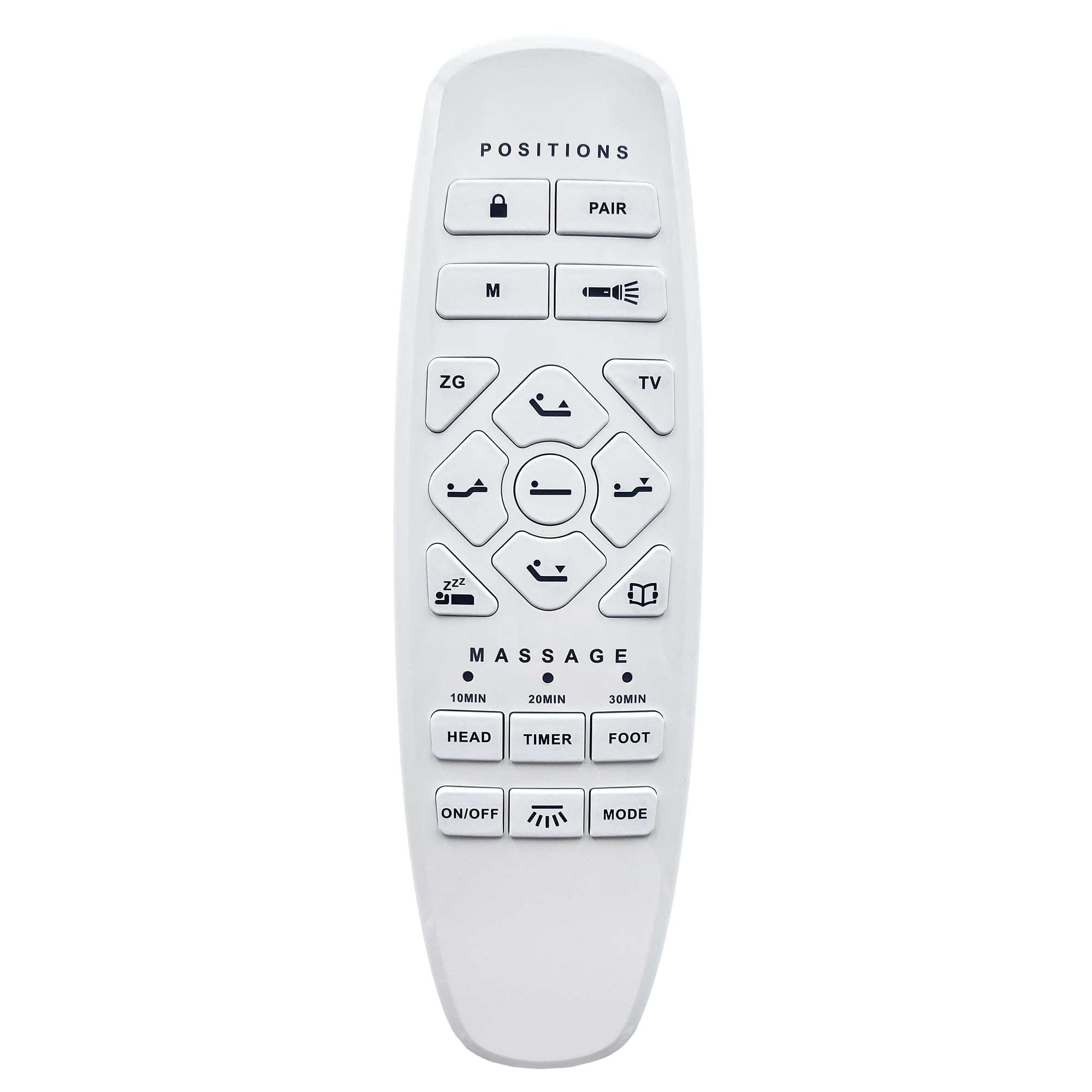
Adjustable Bed Okin Model RF.27.19.33 Wireless Remote Control Replacement | Non-Universal, Only For Lucid l600 Adjustable Bed, Electric Bed Hand($70.99Value)
$70.99
Adjustable Bed Okin Model RF.27.19.33 Wireless Remote Control Replacement | Non-Universal, Only For Lucid l600 Adjustable Bed, Electric Bed Hand($70.99Value)
Description
This is Adjustable Bed Okin Remote Model RF.27.19.33 Replacement, it is only compatible with Lucid l600 Adjustable Bed and CANNOT replace other brands of adjustable beds. Please check your bed brand and model before ordering! This remote control has specific buttons. Please carefully check the button patterns on the remote control. If your old remote has the different buttons, this will NOT work! Pairing Instructions: Step 1: Ensure the remote batteries are functioning. Replace if necessary. Confirm the power cord is connected to a powered source. Step 2: On the control box (underside of base), press the PAIR button twice. The LED light on the control box turns blue. Step 3: On the remote control, press and hold the PAIR button. The light on the remote flashes and starts the pairing process. If the pairing is successful, the LED light on the control box turns to green. If pairing fails, the LED light on the control box turns off. Repeat the steps until pairing is successful The remote used 2 AAA batteries, which need to be purchased separately This remote control can control various functions such as bed angle adjustment. If any questions on your remote, please contact us anytime!
This is Okin Bed Remote Model RF.27.19.33 Replacement, is only compatible with Lucid l600 Adjustable Bed and CANNOT replace other brands of adjustable beds. Please Check your Label Before Ordering! The remote used 2 AAA batteries, which need to be purchased separately. If your buttons and words on your old remote that you are replacing do not exactly match those on the new one shown here in either of the pictures then the chances are it will not work with your base. Please contact us if you have questions before ordering to ensure your remote will work.
In the event that the remote is not paired with the foundation, follow the steps below:
Step 1: Ensure the remote batteries are functioning. Replace if necessary. Confirm the power cord is connected to a powered source.
Step 2: On the control box (underside of base), press the PAIR button twice. The LED light on the control box turns blue.
Step 3: On the remote control, press and hold the PAIR button. The light on the remote flashes and starts the pairing process.
If the pairing is successful, the LED light on the control box turns to green. If pairing fails, the LED light on the control box turns off.
Repeat the steps until pairing is successful.
More Information
| Color | White |
| Mpn | RF.27.19.33 |
| Age_group | ADULT |
| Condition | NEW |
| Gender | UNISEX |
| Product_category | Gl_electronics |
| Google_product_category | Electronics |
| Product_type | Home & Kitchen > Furniture > Replacement Parts > Bed Parts |